
In my previous blog post, I expanded on the importance of growing an organization’s membership base and explained how recruitment marketing is the first step in acquiring members. It is my opinion that any organization’s recruitment strategy must include the ability to create engaging content materials that communicates the value of membership to potential members.
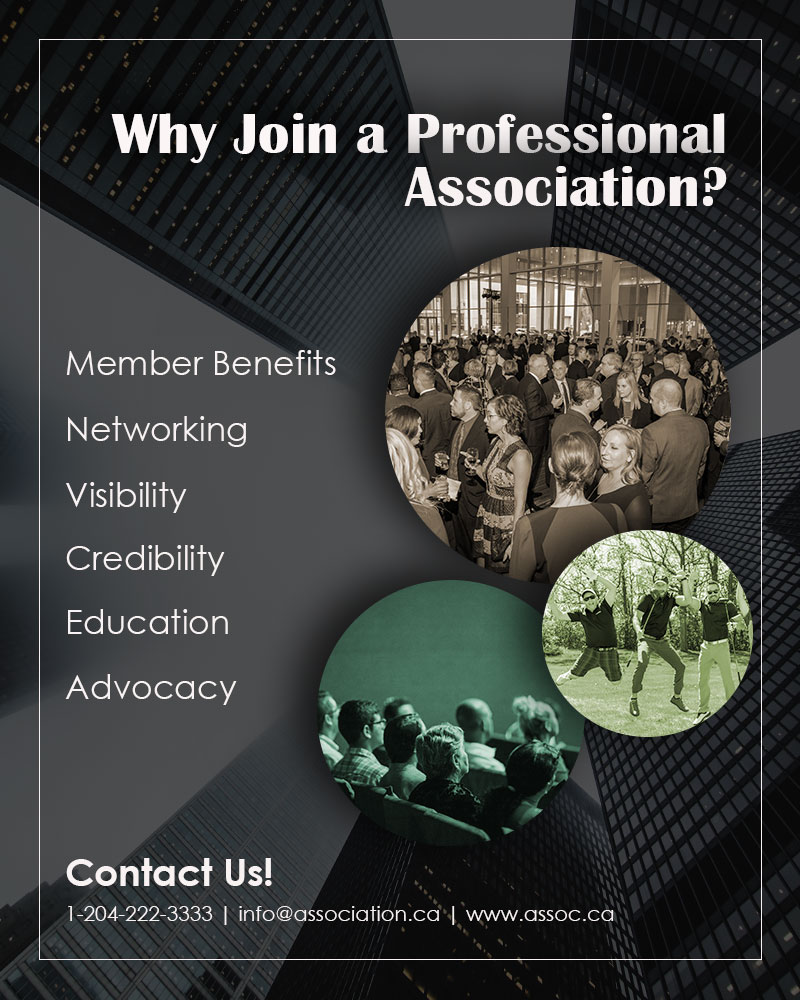
For my graphic design project, I wanted to create a generic, yet informative poster aimed at encouraging professionals to join an association. As you can see (on my draft), I didn’t identify a specific organization as I wanted to create a poster that can be used by any (or most) organizations looking to reach out to potential members. Although the design isn’t specific to a brand, I ensured that all content materials seen on the poster served a purpose in the overall design. Below you will find a comprehensive explanation of my design process and its elements.
The first step was to decide on the look and feel of the design. Associations must exert professionalism as people want to associate themselves with a reputable organization. Creating an eye-catching and sleek poster that personified professionalism was my overall goal. In the planning stages of my design, I envisioned a poster with a dark background and visible white text. In addition, I wanted to ensure that I included relevant images in which captured the attention of my target audience.
The carefully curated images on my poster are describe below…
Image 1: A large group of people networking at an event. I took this photo at one of my association’s Gala event that I had organized. We had over 700 people in attendance. I chose this photo as it showcased an environment where members of the association had an amazing time networking with other members.
Image 2: A “silly” photo of a group of men at a golf course. I took this photo at my association’s golf tournament that I had organized. This event is very popular and one that our members look forward to every summer. Members love getting the chance to strengthen business relationships with other members in a casual and fun setting.
Image 3: A photo of a seminar or presentation. This photo is by Luis Quintero on Pexels. Prospective members often want to ensure that there are educational opportunities offered by the association.
Image 4: An image called “Low-angle Photography of Buildings Covered by Fog”. A photo by Burst on Pexels – I chose this image because high rise buildings are often associated with corporate life, businesses… professionalism.
As someone who works for an association, I have gotten to know the “must-have” features in which potential members look for before joining. Most often, they look for an organization in which provides them with networking opportunities, professional development opportunities, and opportunities where they can mingle with other members in a “non-stuffy” environment. As you can see, the photos that I have chosen are deliberately aimed to reflect my target audience’s needs in hopes of catching their attention.
The text on my poster is also quite deliberate. I wanted the title to pose a question to my audience, “Why Join a Professional Association?” – this stimulates thoughts and discussions. I then give them an answer, the reasons why they should join an association – member benefits, networking, visibility, credibility, education and advocacy. Then at the bottom, a call to action – “Contact Us!” which includes a phone number, email address and website (made up examples). Providing the audience with a way to contact you keeps the flow of communication open and providing them with a website where they can learn more about your organization creates transparency.
With the contents of my poster now chosen, the next step was to carefully compose it. I chose to follow the five rules of shot composition in order to create an effective, yet visually appealing poster.
Simplicity – I concentrated on a few basic elements such as the title, text and photos, and ensured that everything is readable to my audience. The photos I chose are also relevant and clear.
Rule of Thirds – I placed my contents near points of interest in order to create a balanced composition.
Balance – I ensured that the colours on my poster are balanced. The dark background created a nice contrast to my white text. In addition, I transformed my photos into earthy tones in order to stand out slightly, but not overwhelm. You can see the deliberate placement of the text also creates a balanced distribution on the poster.
Framing– I included a thin border around my poster in order to highlight the images and text, and to drive focus on the main content.
Lines – Natural lines provides a sense of depth and perspective. I wanted to draw attention to the focal point of the poster, which was the images. The way the buildings are captured in the photo creates a natural line drawing the viewer’s attention to the carefully selected images.
By using photoshop, I was able to create different effects in order to amplify the contents in my poster. First, the high-rise buildings photo was placed as the background, then a darker, transparent layer was set over top. I then created three new layers and by using the “ellipse tool” I created three circles and arranged them in staggered positions. With the “clipping mask” I was able to clip my images to the shape. In order to mute the colours of the photos, I used “colorize” and played around with the saturation and hues until I achieved the earth tones that I was comfortable with. I then added a “drop shadow” effect to add more depth to the photos and the title text.
And there you have it folks… my first graphic design draft done on Photoshop!
 Cyrille McIntosh
I really like your overall design; it is simplistic and appealing. The placement of the buildings is well thought-out because it definitely pulls your eyes towards the pictures. I think the white border is a nice touch that adds to its professional impression. Honestly, there isn’t much I would change.
One suggestion that I have would be to play around with the colors to see if there are any other combinations that might be more appealing. Everything feels just a bit muted; I feel like I am looking for something to pop out at me and it doesn’t yet. The white doesn’t feel like it is bright against the black background as much as it should be. I would also make the contact information bolder. It is positioned on the most detailed/busiest part of the building so it gets a bit lost in the detail. Bolding the font would make sure it sticks out a bit more.
LikeLiked by 1 person
Posted on behalf of William McMeekin:
Hi Cyrille, one of the first things that struck me when I opened your project was the rule of three. Your storytelling is strong in every sense. The white font jump off the page and tell your story with strong messaging with an incredible economy of words, one each! The page itself has a hue that is unique, I can tell you took time to find the perfect light and shading to bring out nostalgia and a solid pallet for your art. The use of gradient shows how the story has only started and there is more in the future for a person to enjoy should he or she embark on the journey. You bring gestalt principals nicely with similarity with the circles while making each one look different. Your page has unity in spades. Your story telling is strong with each of the three elements complimenting each other to invite the viewer into the story. The feature I really appreciate is the contact us information. Some site put their contact information in another color. You stuck with the white font which imparts the same class as your other messaging. The assignment mandates that the viewer provides critical feedback to the artist. I find it challenging to do so on this site. One thing that comes to mind is the center circle with the golfers. The subject matter seems to have a hue that shoots out at my eye. While the rest of your collage has a velvety smooth look, the golfers seem to be shot at me with a flashlight. Perhaps lowering the brightness or framing it with a vignette affect may soften the look. I think it is a yellow hue that is grabbing my attention. This project is outstanding, and I can tell you put a lot of time and effort into it. Nice job. Respectfully, William McMeekin
LikeLike
Hey Cyrille,
I haven’t experienced many businesses who’ve focused on recruiting/onboarding. After reading about your topic I totally understand your thought process. Here are my comments and suggestions:
• When thinking about your topic of recruitment marketing, the first thing that comes to mind is persuasion. You were on the right track when you included an image of the men at the golf club because it’s fun and inviting! One area that I think can be improved is the color. The background feels a little too dark and then the images have the dark shades as well (the brown and green). As a happy medium, maybe try a blue as the background overlay? Or see what it looks like with the background as it is and the three bubble images in their normal colors? Something else that might help is shortening the distance of the shadows behind the images. This should brighten the poster up, but keep the professionalism you’re looking for.
• I think the contact information is in the best spot! Usually on websites, posters, brochures, etc. you’ll see the contact information at the bottom or back. However, it is slightly hard to read at first glance (up against the building image). Try using the rectangle tool, in the color white, with a light opacity (30-40%) as a background behind the contact information.
• Composition wise I think you’ve done awesome! The text is big enough to read, the images are staggered in a way that’s easy for the eye to follow, and I like that you’ve included all necessary details for a poster (a title, description, imagery, and contact information). As you’ve noted, it was important to ask a question (the why) and then provide the answer and leave an opportunity for further questions. Naturally, viewers read from left to right and all the elements flowed well. Therefore, I believe the composition and layout of the content is visually strong.
• I also like that you’ve kept the poster generic! Anything that you can repurpose for any business or occasion is always a plus.
Overall this was great!
LikeLiked by 1 person
Hi group! I appreciate the time you took to look at my work and for providing me with such thoughtful comments and suggestions!
Upon reviewing the above feedback, it seems that the main critique from the group pertained to the colors of my three circular images. I agree that the hues should be adjusted a bit more to offset the dark background. I will look to find the proper combination of colors that would complement my poster. Also, a couple of the comments received stated that the contact info at the bottom gets lost in the background’s detail. I agree with this observation and will find a solution to make that section pop out a bit more. I like the idea of using the rectangle tool in a lighter color as the backdrop to the “contact us” section.
Thank you again for your helpful feedback! I am excited to revise my draft.
LikeLike